
Protect your cloud from the risks that actually expose data, and prove every fix.
WASViking Cloud Security connects to your cloud accounts through a read-only role, inventories every resource, checks it against the controls your frameworks require and turns the combinations that expose data into attack paths with the fix that breaks them. If you are evaluating Wiz, the graph will look familiar. What comes after it is the difference: the vulnerable package patched on the host under your approval, the attack your edge is seeing counted in the score, and a next evaluation that proves the path is gone.
- prod-web-01: 7 vulnerabilities closed by a verified patch job
- prod-app-role scoped to the objects the application reads
- Path re-evaluated: no route left from the internet to personal data
Everything in your cloud account, read, evaluated and protected.
One read-only role per account is all it takes. Cloud Security inventories what runs there, checks every resource against the controls your frameworks require, and follows every change, so the posture you report is the posture you have.
-
Every resource, with its relationshipsCompute, network, identity, data stores, logging and AI services across every enabled region, inventoried within minutes of the first connection.
-
The controls your frameworks requireEach resource checked against built-in controls referenced to CIS, PCI DSS and NIST, with the fix in console, CLI and code form.
-
Risk in context, not in a listExposure, identity, data, host vulnerabilities and edge traffic combined into attack paths, each with the fix that breaks it.
-
Every change judged, every fix provenChanges judged in seconds, fixes verified by the next evaluation, and reports ready for the auditor.
Prioritize cloud risks with the context around them.
A misconfiguration alone is a hygiene item. Next to an exploitable workload, a wide role and personal data, it is the way in. Cloud Security reads those facts together, adds what the server agent, the edge and your code know about the same resources, and names the chain.
- 1Edge
Edge Threat Radar sees hostile requests against shop.acme.example in the last 24 hours.
- 2Host
The server agent on prod-web-01 reports a critical vulnerability with a vendor fix.
- 3Cloud
The instance does not require IMDSv2, and the bucket policy allows public read.
- 4Identity
prod-app-role can run every data action on the bucket that holds personal data.
- 5Code
The role is defined in envs/prod/iam.tf, line 41, so the fix lands in the repository.
The edge and host facts come from Edge Threat Radar and Infrastructure Defense on the same assets, and the code fact from a connected repository.
Illustrative data from the ACME demonstration tenant
Where the difference shows up in daily work.
Both platforms read your cloud without an agent, map how resources reach each other and rank what matters. The difference is in what the score knows, how far the fix goes, and what a closed finding proves.
The fix lands on the host
When the WASViking server agent runs on the instance, the vulnerable package on an attack path becomes a patch job with approval, maintenance window and rollback. The reassessment proves the vulnerability closed, and the next cloud evaluation proves the path is gone.
A score that sees the attack
With Edge Threat Radar connected to your CDN or WAF, hostile traffic against a workload in the last 24 hours raises its risk. The team starts with what is being attacked today, not only with what could be.
Every point has a name
The risk of a finding is a sum of named factors from stored facts, and Critical needs two independent signals. A permission you did not grant reads Not evaluated, never passed, so a quiet account is never mistaken for a clean one.
Proof that leaves the console
Resolved is written by the next evaluation, never by hand. Posture Shares show the cloud posture to a customer, an auditor or an investor without a seat on your portal, and every exception carries an approver and an expiry date.
One chain, two breaks, one proof.
An internet listener, a workload with a critical vulnerability, a role with data actions on every object, and the bucket that holds personal data. ACME broke the chain in two layers on the same afternoon, and the next evaluation closed it.
Chain proven: an internet listener, a workload the server agent reports with a critical vulnerability, a role with data actions on every object, and the bucket that holds personal data. Two breaks: Resolve patched the package on prod-web-01 under an approved change, and the role was scoped in code to the objects the application reads.
- Attack path to personal data92
- Exploitable workload reachable from the internet100
- Role with data actions on every object74
- Workload still targeted at the edge87
The workload stays on the queue while the edge still sees attacks. The account score falls only when the evaluation proves the fix.
The capabilities you are evaluating, row by row.
Products are not clones, so compare the job each one does. The left column names the capability as Wiz presents it; the right one shows where it lives in WASViking and what it adds.
Resources and relationships
A graph of cloud resources, identities and how they connect.
Inventory and Architecture Map
Every resource with its relationships, drawn as a map with the risk and attack path overlays.
Toxic combinations
Misconfigurations correlated with exposure, identities, vulnerabilities and data.
Paths with break options
Each step with its evidence, the blast radius, and the fixes that break the chain ranked by lowest impact.
Break options rankedVulnerable workloads
Vulnerabilities found on workloads, prioritized and routed to the owner.
Patched on the host
With the server agent on the instance, the package is patched under approval and the host is reassessed.
Fixed, not only foundChanges as they happen
Configuration changes detected in near real time.
Changes judged in seconds
Each change judged as risk introduced, removed or none, with the actor, the tool and the file in code.
Fixes and automation
Remediation guidance, one-click fixes and automation rules.
Governed fixes
Work items with owner and ticket, and optional fixes applied under a second person's approval, with Roll back.
Approval and rollbackCompliance assessment
Posture against built-in and custom frameworks, with reports.
Evidence that holds up
Pass and fail per framework with what was not evaluated stated, exceptions with expiry, and Posture Shares.
Not evaluated, never greenSame package, same rule, different urgency. The score knows why.
A score built only from what the cloud account reports ranks two web servers with the same vulnerability almost the same. WASViking also reads what the rest of the platform sees about each workload, and every point on the score has a name.
Why web-portal-01 scores 96
Risk of the finding, points per factor
The edge factor appears when Edge Threat Radar is connected to your CDN or WAF, and the vulnerability factor when the server agent runs on the instance.
web-portal-02 waits its turn
Same package, same rule, reachable from the internet but quiet at the edge and on no attack path: it scores 84 and lands below web-portal-01. The team fixes the server that is being attacked first, and can explain the order to anyone who asks.
Critical needs two signals
A finding reaches Critical only with two independent signals, such as a high severity and an attack seen at the edge. A severe control on an isolated development resource stops at High, so Critical keeps its meaning.
Missing evidence never scores
A factor the platform could not prove adds nothing, and a permission you did not grant shows as Not evaluated. When the attack traffic stops or the package is patched, the factor leaves the score on its own.
Twelve weeks of a cloud that gets safer on the record.
Every point on this line comes from an evaluation, never from a ticket count. Connecting a new account pushes the score up, verified fixes bring it down, and leadership sees the trend without anyone building a spreadsheet.
ACME organization, Cloud Risk
Weekly, from evaluations only. Lower is better.
Internet-reachable resources, by proof
58 resources the configuration says can be reached
Each level adds more to the score than the one below, and the resource page shows the evidence behind it.
Illustrative data from the ACME demonstration tenant
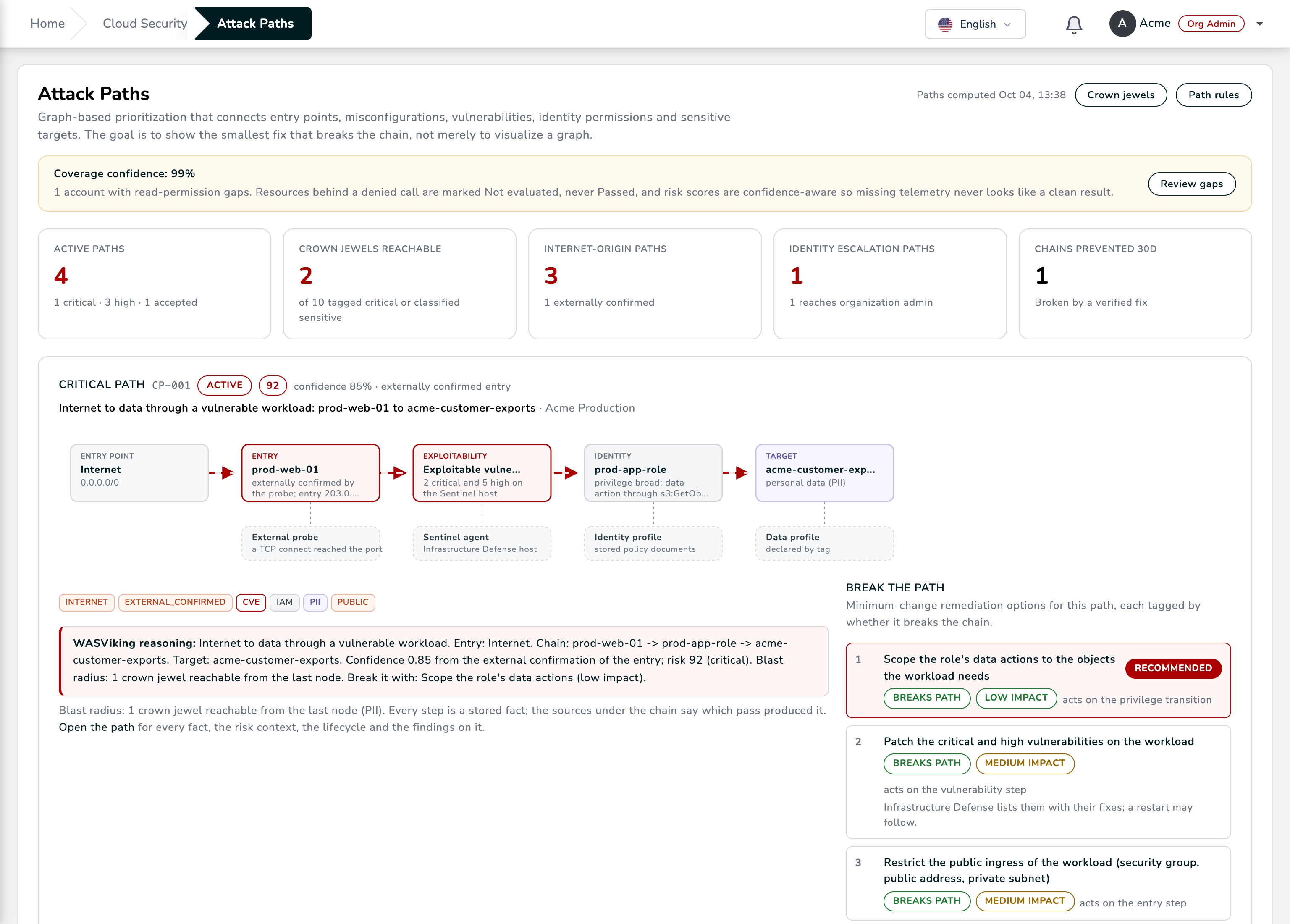
The attack path, with the fixes that break it.
Each step is a stored fact with its source: the outside probe, the server agent, the identity profile, the data profile. The break options are ranked by impact, and patching the workload is one of them.
One loop from a connected account to a proven fix.
Six steps on the same resource record. The loop runs on a schedule for every account, and in seconds for every change when real-time events are on.
-
Connect
A read-only role from our template, validated, with the permission coverage measured.
-
Inventory
Every resource, its configuration and its relationships, with the history of each version.
-
Evaluate
Every control of the packs you enabled, with the evidence of what was read.
-
Prioritize
Exposure, identity, data, host vulnerabilities and edge traffic in one score.
-
Fix
A work item with owner and ticket, a patch job on the host, or an approved fix in the account.
-
Prove
The next evaluation resolves the finding, breaks the path and records the risk drop.
Infrastructure Defense on the instance and Edge Threat Radar at your edge add the host and attack factors to the same loop.
Evidence your auditor recognizes, produced while the team works.
Every control carries its framework references and the evidence of what was read. Exceptions are requested, approved and dated. When an auditor, the DPO or a customer asks for proof, it already exists.
Foundations measured on every account
Identity, storage, logging, monitoring and networking controls referenced to the benchmark sections, with the failing resources named on each control and the fix in console, CLI and code form.
Cardholder data accounts under control
Network, stored data, access and logging controls referenced to the requirements, a dated record of each exception with its approver, and the SLA preset for critical findings.
Security measures you can demonstrate
Dated evidence that the stores holding personal data are inventoried, classified, kept off the internet and measurably improving, collected through a role that reads configuration only.
Share the posture, not the console
A signed, read-only view of your cloud posture for a customer, an auditor or an investor, with the date on it and no seat on your portal.
Everything the auditor takes away
The executive PDF, the posture CSV and the evidence pack tell the same story, on a schedule or on demand.
Accepted risk with a name and a date
Requested on the finding, approved under your policy, dated with a compensating control, and announced to the team when it expires.
Capability by capability, what each platform delivers.
Rows follow the capabilities a cloud posture evaluation usually covers. Where both platforms do the job well, we say so.
| Capability | Wiz | WASViking® Cloud Security |
|---|---|---|
| Connection and inventoryRead, map, follow | ||
| Agentless connection | Agentless connection through the cloud provider APIs | A read-only role you create from our template, a unique External ID per account and temporary sessions; object contents, secret values and function code are never read On par |
| Inventory as a graph | Security Graph of resources, identities and their relationships | Inventory with relationships across every enabled region, and an Architecture Map with the risk and attack path overlays, saved views and PNG or SVG export On par |
| Changes in near real time | Real-time detections on configuration changes | Each change judged in seconds as risk introduced, removed or none, with the actor and the tool; drift from code named by file and line On par |
| Context and prioritizationWhat matters first | ||
| Controls with the fix | Built-in configuration rules with remediation guidance | Built-in controls with framework references, grouped in policy packs, each with the fix in console, CLI and code form On par |
| Attack paths | Attack path analysis and toxic combinations on the Security Graph | Each path with the evidence of every step, the blast radius and the break options ranked by lowest impact On par |
| Exposure validated from outside | Dynamic scanner that connects from the outside to validate exposure | The platform's outside-in check confirms the listener answers, and the proof is named on the score On par |
| Attack traffic in the score | Threat detection and response in Wiz Defend, a separate product | With Edge Threat Radar connected, hostile traffic against the workload in the last 24 hours raises its cloud risk, inside the same posture queue Goes further |
| A score you can defend | Issues ranked by severity using graph context | A risk score per finding, account and organization as a sum of named factors; Critical needs two independent signals, and missing evidence never scores Goes further |
| From finding to fixRemediation | ||
| Tickets and ownership | Ticketing and workflow integrations with ownership routing | Work items with plan, owner, ticket and verification, sent to Jira or ServiceNow, alerts to Slack, Microsoft Teams, email or webhooks On par |
| Fixes applied for you | One-click fixes and automation rules for auto-remediation | An optional second role with an allow-list of reversible actions you choose, a request, an approval by someone other than the requester, a record, and Roll back On par |
| The vulnerable workload on the path | Vulnerability findings on the workload, prioritized and routed to the owner | With the server agent on the instance, Resolve patches the package under approval, with maintenance window and rollback, and the reassessment proves it closed Goes further |
| Closing a finding | Issues resolve when the condition is no longer detected | Resolved is written by the next evaluation that proves the fix, with the verified risk drop kept on the record On par |
| Evidence and platformBeyond the console | ||
| Compliance reporting | Compliance posture and reports for built-in and custom frameworks | Pass and fail per framework with the Not evaluated count stated, the compliance CSV, the executive PDF and the evidence pack On par |
| Posture shown outside the company | Compliance reports exported from the platform | Posture Shares: a signed, read-only view of the cloud posture for a customer, an auditor or an investor, without a seat on your portal Goes further |
| Beyond the cloud account | Cloud, code, runtime and attack surface products | The same platform tests the applications with DAST, patches servers through its agent, reads attack traffic at your edge and watches the software supply chain, on the same assets Goes further |
Built for the team that has to fix it, not only find it.
What decides a platform is the week after the demo, when the queue is real. These are the details that keep the cloud team and the security team working from the same facts.
Not evaluated is never green
A permission you did not grant reads Not evaluated and lowers the coverage confidence of the account. The validation page lists the exact actions to add, so the number on the screen is honest about what it saw.
Changes with a name on them
Every change carries the actor, the tool that made it and the findings it opened or closed. A change made outside your infrastructure as code reads as drift, with the file and line to fix at the source.
The map your architects would draw
The Architecture Map draws accounts, regions, networks and subnets from the stored facts, with the risk and the attack paths on top. Save a view for each audience and export it for the design review.
Exceptions that expire
Accepted risk is requested on the finding, approved by someone with the right to approve, dated with a compensating control and announced when it expires. Nothing stays accepted by forgetting.
Alerts where the team already works
New findings, exception requests and expirations go to Slack, Microsoft Teams, email or webhooks, and findings reach Jira or ServiceNow through the ticketing integration.
Read-only means read-only
The assessment role never writes. Fixes applied for you use a separate, optional role with only the reversible actions you tick, and nothing runs without a request, an approval and a record you can roll back.
Evaluate on your own account, next to what you run today.
No cutover and nothing to install to start. The proof of concept runs on a real account, so the comparison uses your resources, your paths and your fixes.
Connect one account
Create the role from our template, paste its identifier and validate. The first inventory and score arrive within minutes.
Compare the top of the queue
Put the first ten items of each tool side by side for the same account and check whether the reason behind each rank holds up.
Break the first attack path
Apply the lowest-impact break option and watch the next evaluation prove the path is gone, with the risk drop on the record.
Bring in the rest
Connect the remaining accounts or the whole organization, add the server agent to the workloads on your paths, and connect Edge Threat Radar to your CDN or WAF.
Frequently asked questions
What does WASViking need in our cloud account?
A read-only role created from our template, trusted only with the External ID generated for that account. There is no agent to install and no credential stored on our side. The server agent and Edge Threat Radar are optional and add the host and attack factors where they run.
What can WASViking read, and what does it never read?
It reads configuration and metadata: resources, policies, network rules, tags and their relationships. It never reads object contents, secret values, function code or database rows, and removing the account stops every read at once.
Can WASViking change anything in our account?
Only if you deploy the optional remediation role, and only the reversible actions you tick on it. Every write needs a request, an approval by someone other than the requester, and leaves a record with Roll back. The assessment role never writes.
Can we evaluate it next to the tool we use today?
Yes. The read-only role is independent of any other connector in the account, so both platforms can assess the same accounts during the proof of concept and you compare the results on the same resources.
How is the risk score calculated?
As a sum of named factors from stored facts: the severity of the control or rule, the exposure the platform proved, identity privilege, data classification, host vulnerabilities, attack traffic at the edge and business context. Every screen shows the factors, a finding reaches Critical only with two independent signals, and a factor that could not be proven adds nothing.
How fast does a change show up?
Every account is assessed on a schedule. With real-time events turned on, a change is evaluated in seconds and judged as risk introduced, removed or none, with the actor and the tool that made it.
Wiz, Wiz Defend and the other Wiz product names are trademarks of Wiz, Inc. WASViking LLC is not affiliated with or endorsed by Wiz, Inc.
The Wiz column reflects publicly available product information reviewed in October 2026. Features, editions and licensing terms vary by contract and change over time, so validate each row in your own evaluation. ACME figures on this page are illustrative data from a demonstration tenant, not customer results.