
A scanner hands you a list. WASViking hands you the order to fix it in, and the proof it was fixed.
Acunetix is a capable web vulnerability scanner. WASViking tests web applications and APIs with the same depth, then does the part a scanner leaves to your team: it ranks every finding by real risk, sends it to the tracker your developers already use, closes it when the fix is verified, and turns the result into evidence an auditor or a customer accepts.
- DNS and HTTP interaction from the target, token scoped to this scan
- 312 blocked requests to this endpoint at the edge in 7 days
- Jira ACME-1482 opened, SLA due in 30 days
Where the difference shows up in daily work.
Both products crawl, authenticate, test and report. The difference starts after the scan: what the finding knows about your business, where it goes next, and what it proves when it closes.
Ranked by risk, not only by severity
The Risk Score reads exploitation data, what the asset holds, whether it is exposed, and attack traffic your edge is blocking right now. A medium finding under attack on the checkout API goes before a critical one on an internal staging host.
The ticket and the finding stay in sync
A finding opens a Jira or ServiceNow card with labels your team can filter on. When the fix is verified, the card closes with a note saying who closed it and why. If the issue comes back, both reopen.
Internal apps without opening the network
The Sentinel agent reaches internal applications over an outbound-only mutual TLS tunnel. No VPN, no jump host, no inbound firewall rule, and the console stays in the cloud with everything else.
Evidence, not just a PDF
Findings map to PCI DSS, ISO 27001, LGPD, GDPR and BACEN. Evidence Bundles and Posture Shares give an auditor or an enterprise customer a controlled, dated view of your posture without handing over console access.
The scan is step two of five.
A standalone scanner covers the step in the middle. WASViking runs the whole path from finding the asset to proving it is safe, so nothing gets lost between tools.
Discover
Subdomains from certificate transparency and passive DNS, certificates and exposed ports, before anyone adds them as targets.
Test
Web apps and APIs, authenticated, external or internal through Sentinel, with our own out-of-band collaborator.
Prioritize
Risk Score with business context, Exploit Path Graph for chained risk, live attack traffic from Edge Threat Radar.
Fix
Two-way Jira and ServiceNow, SLA per severity, recommendations a developer can act on, CI gate on new findings.
Prove
Verified rescan, audit trail, Evidence Bundles and Posture Shares mapped to the frameworks you answer to.
Dark step: what a standalone web scanner covers. The rest runs in the same WASViking console, on the same findings.
Severity tells you how bad a bug can be. Risk tells you what to fix on Monday.
Sort ACME's findings by severity and the internal SQL injection comes first. Sort by Risk Score and the team starts with the API that customers use and attackers are already probing.
ACME top findings, by Risk Score
Risk Score 0 to 100, with the scanner severity next to each name
Edge signals appear when Edge Threat Radar is connected to your CDN or WAF.
Payloads that fit the target
The Environment Profile learns each host's database, framework and rendering model, so SQL injection payloads match the detected database and XSS checks follow single-page rendering. Fewer dead-end requests, fewer findings your developers argue with.
Chained risk made visible
The Exploit Path Graph connects findings that are harmless alone and dangerous together, and ranks the chokepoint that breaks the chain with one fix.
Every finding carries its proof
Raw HTTP transcript, the payload that worked, database evidence for SQL injection and out-of-band interactions for blind classes. Engineering review starts from facts.
Twelve weeks of a backlog that actually shrinks.
A scanner shows how many findings exist today. WASViking shows whether the program is working: what closed, how fast, and whether anything is past its deadline.
ACME open critical and high findings
Weekly count of open findings. Lower is better.
Where ACME's open findings come from
104 open findings, one console
Close to half of what ACME had to fix would not appear in a web scan report alone.
Illustrative data from the ACME demonstration tenant
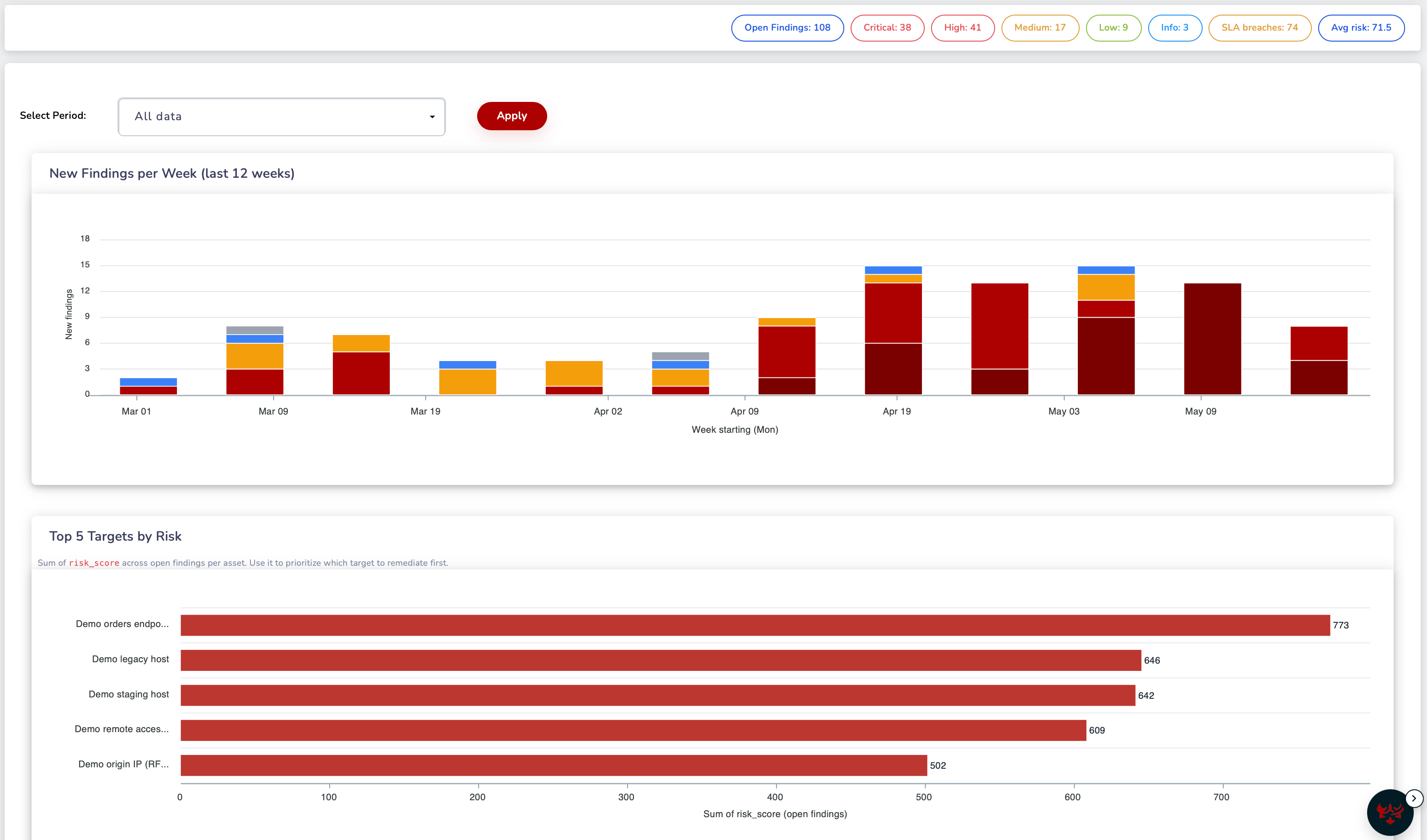
One view of every finding, its risk and its deadline.
New findings per week, the targets carrying the most risk, and SLA breaches in the same place, so the security lead and the engineering manager read the same numbers.
Capability by capability, what each product delivers.
Where both products do the job well, we say so. The difference is in what happens around the scan.
| Capability | Acunetix | WASViking® |
|---|---|---|
| Testing depth | ||
| Web vulnerability coverage | Broad catalog, from SQL injection and XSS to misconfigurations | SQL injection, XSS, JWT, SSRF, command injection, SSTI, XXE, deserialization, IDOR and race conditions, with payloads adapted to each host by the Environment Profile On par |
| Blind and out-of-band classes | AcuMonitor out-of-band service | Our own OAST collaborator with a token per scan, HTTP and DNS interactions stored with the finding On par |
| Proof on each finding | Proof of exploit for supported vulnerabilities | Raw HTTP transcript on every finding, database evidence for SQL injection, out-of-band interactions for blind classes On par |
| Authenticated scanning | Login sequence recorder | Recorded login in the Interactive Login Browser, AI-assisted form login, and one authenticated session shared by every analyzer, so the account is not locked out Goes further |
| APIs | REST, SOAP and GraphQL | REST, GraphQL, SOAP and WSDL, and WebSocket On par |
| Reach | ||
| Internal applications | On-premises installation inside the network | Sentinel agent with an outbound-only mutual TLS tunnel: no VPN, no inbound ports, one cloud console for internal and external targets Goes further |
| CI/CD | Pipeline integrations | Sentinel CI gate with exit codes and a baseline, so a build fails on new findings and not on the known backlog On par |
| Software supply chain | Runtime SCA through the AcuSensor sensor installed in the application | SBOM from the outside, from your build and from your repositories, watched daily against OSV and CISA KEV, with nothing installed in the application Goes further |
| From finding to fix | ||
| Prioritization | Severity per vulnerability | Risk Score 0 to 100 from exploitation data, exposure and business context, plus live attack traffic from Edge Threat Radar and chained risk in the Exploit Path Graph Goes further |
| Issue trackers | Export to Jira, Azure DevOps, GitHub, GitLab, Bugzilla and Mantis | Two-way sync with Jira and ServiceNow: card and finding close together on a verified fix, reopen together on a regression, with labels and a closure note on the card Goes further |
| Compliance evidence | Compliance reports such as PCI DSS, OWASP Top 10 and ISO 27001 | Findings mapped to PCI DSS, ISO 27001, LGPD, GDPR and BACEN, with Evidence Bundles and Posture Shares an auditor or customer can open on their own Goes further |
| CommercialLicensing | ||
| What counts as a target | Each fully qualified domain name, with a limited number of variations per target | Each primary asset you scan. Subdomains discovered under a target do not use additional target slots Goes further |
What your team gets that a scanner does not ship.
These run on the same targets and the same findings as the DAST engine, in the same console, with the same audit trail.
Edge Threat Radar
Traffic from your CDN or WAF, classified from verified crawler to authenticated attack. Findings on endpoints that are being hit move up the queue, and blocks go through an approval step.
Header Advisor
A Content Security Policy learned from what real browsers load on your site, in report-only mode first, so the policy you enforce does not break production.
Attack surface discovery
New subdomains, certificates close to expiry and sensitive ports that should not be open, found continuously and offered as targets before someone remembers to add them.
AI Scan Planner
A daily review of the portfolio that suggests what to scan next and why. Every suggestion shows its inputs and your team can reject it.
Code Security
SAST, dependencies, secrets and SBOM from your repositories, so code-level context sits next to the runtime finding without a sensor inside the application.
Scans from Slack
Start a scan and get the result in the channel with a slash command, with every command recorded in the audit trail.
Run both on the same targets and compare what you get.
The evaluation uses your applications, your login flows and your tracker, so the decision rests on your own results.
Add your targets
Start with the applications you already scan. Attack surface discovery then shows what is missing from that list.
Record the logins
Capture each login once in the Interactive Login Browser. Every analyzer reuses the session.
Compare the findings
Put both reports side by side. Look at what each one confirms with evidence and what each one ranks first.
Connect the tracker
Turn on Jira or ServiceNow for one team and watch a finding go from card to verified fix without anyone updating two tools.
Frequently asked questions
Can WASViking replace Acunetix for our web applications and APIs?
Yes. WASViking tests web applications and APIs with authenticated scanning, blind-class detection and per-finding evidence, and adds prioritization, two-way ticketing and compliance evidence on top. It can also take over adjacent work, such as a separate SCA product or a spreadsheet of certificates.
Do we need to install anything inside our applications?
No. DAST runs from the outside, internal targets are reached through the Sentinel agent on any host in the network, and code-level context comes from Code Security scanning your repositories.
How are false positives kept under control?
Payloads follow the Environment Profile of each host, soft 404 pages are calibrated before sensitive file checks run, and blind classes are confirmed by an out-of-band interaction. Every finding carries the request and response that produced it, so a developer can check it in minutes.
Can we run both products during the evaluation?
Yes. Point both at the same staging targets and compare the results. WASViking scans can be scheduled inside a window so the two do not load the application at the same time.
How is it licensed?
By plan and number of scan targets. Subdomains discovered under a target do not use additional target slots, and subdomain discovery, certificate checks and supply chain visibility are part of the plans, with limits by tier. Optional modules are quoted by scope, from your real target list.
Acunetix, AcuSensor and AcuMonitor are trademarks of their respective owner. WASViking LLC is not affiliated with or endorsed by the owner of those trademarks.
The Acunetix column reflects publicly available product documentation reviewed in September 2026. Features, editions and licensing terms vary by contract and change over time, so validate each row in your own evaluation. ACME figures on this page are illustrative data from a demonstration tenant, not customer results.